From AWS to Exoscale: A field report
Lessons from migrating a software project from AWS to Exoscale: what we moved, what was missing at first and how the switch went without downtime.
Moving between cloud providers is often a major undertaking, especially when the infrastructure was built on, and grew around, vendor-specific services. Every platform has its quirks and its own services, and these can be deeply integrated into applications. With so-called vendor lock-in, a customer cannot simply replace a service or product they use with an equivalent one from another provider. That often makes moving from one cloud provider to another very time-consuming, because the product first has to be reworked to run on other platforms. At agsolutions, our general approach is to avoid vendor-specific services wherever we can, so that we don't end up in vendor lock-in.
We recently moved a healthcare application we developed from AWS (Amazon Web Services) to Exoscale and learned a lot along the way. Because we had moved away from AWS-specific cloud services for the application, the migration turned out to be less complex from the start. In this article I share what we learned and go through the challenges, steps and considerations a successful migration requires.
Why switch from AWS to Exoscale?
AWS is known as a global cloud giant and offers a wide range of services, but it also comes with relatively high prices and a level of complexity that is often more than some SMEs need. Exoscale, by contrast, is a European provider that focuses on data protection, simplicity and cost efficiency. Switching to Exoscale can therefore make sense for organisations looking for a leaner, GDPR-compliant cloud infrastructure.
Data stays in Austria
Besides its European focus, Exoscale also has data centres in Austria, which is a clear advantage for local companies and organisations. Austrian zones allow a cloud infrastructure close to the organisation itself, with low latency and high data availability. Because data stays within the country, Exoscale is an attractive choice with regard to the GDPR in particular: data protection standards and compliance requirements are easier to meet.
e-card connection
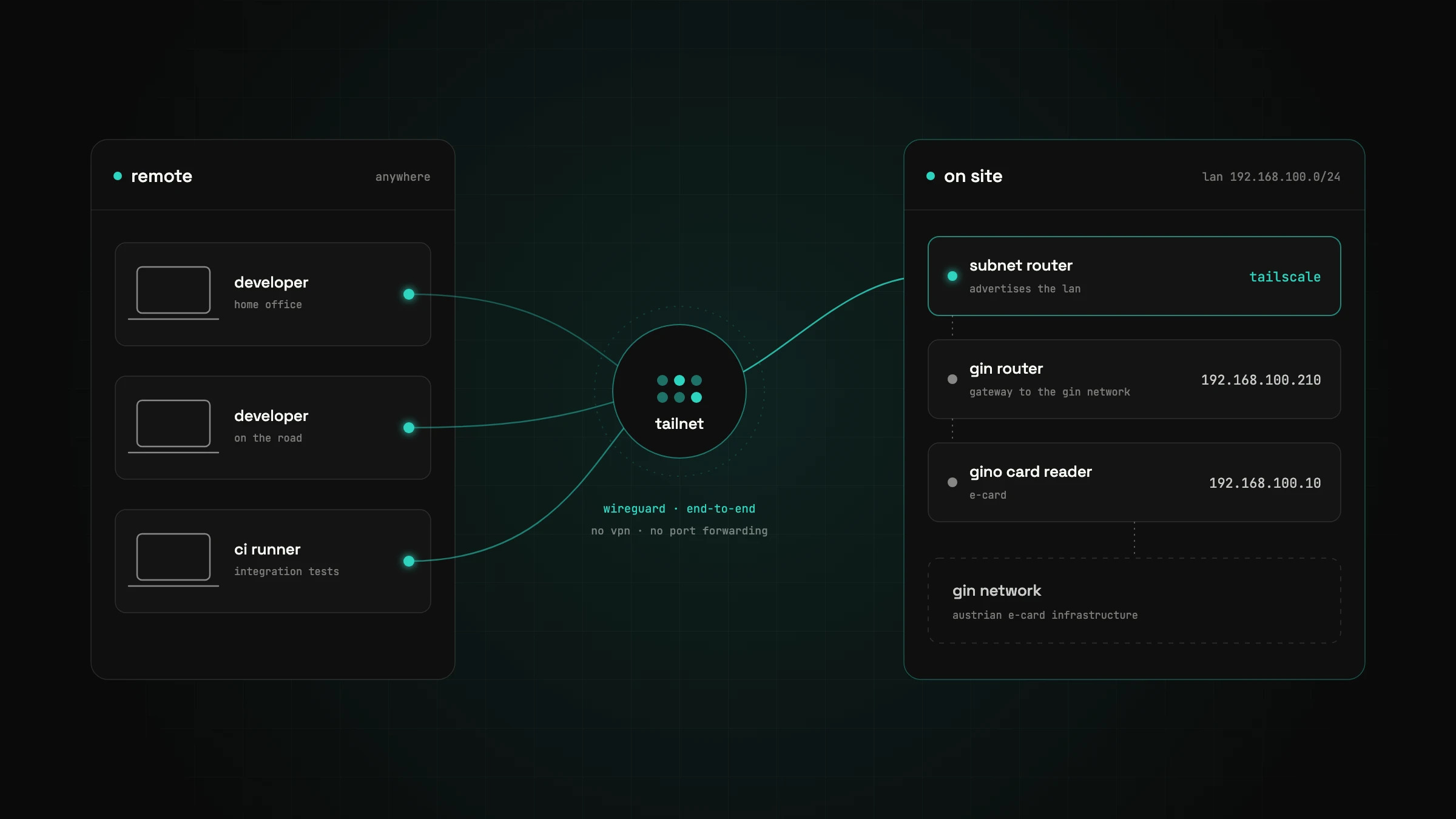
Exoscale also supports a connection to the Austrian e-card network, which is essential for healthcare institutions. Through this connection the application talks directly and encrypted to the cloud services of the Austrian social insurance, which makes data exchange in healthcare simpler and faster.
Personal support
Another advantage of Exoscale is personal support that works directly with companies. Instead of anonymous support tickets and changing contacts, Exoscale offers dedicated experts who know the customer's requirements. That makes solving problems much easier, because direct help is available for technical questions or issues.
Choosing the Exoscale services
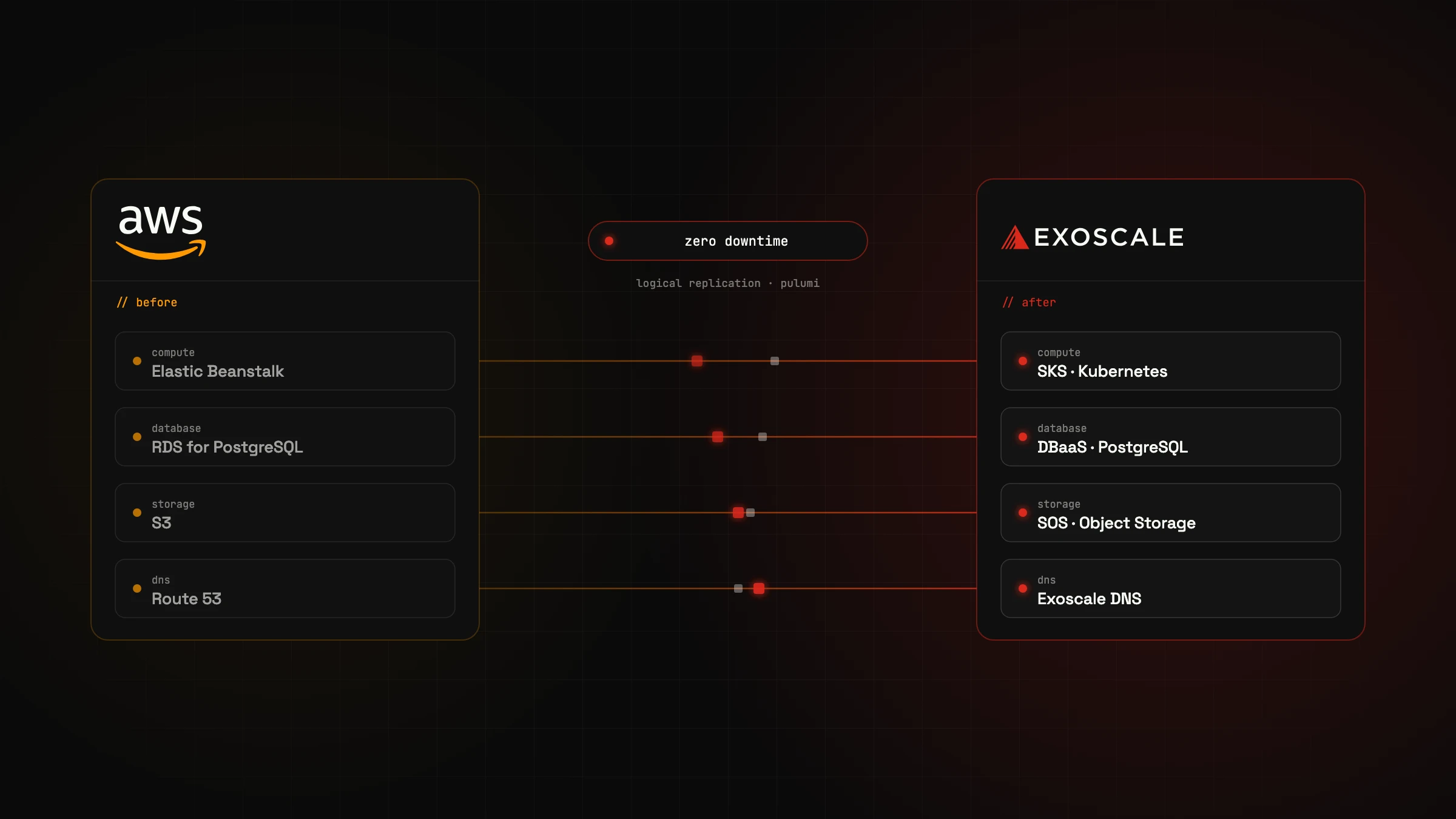
Which AWS services do we use, and what are the alternatives at Exoscale? The healthcare application relied on a number of services, some of them AWS-specific. Exoscale does not offer the same range of services, but we were able to find alternatives, some of them even better:
Beanstalk to Kubernetes
Before the migration, AWS Elastic Beanstalk was used to provision complete environments for the application automatically. Beanstalk managed EC2 instances, load balancers, networks, SSL certificates and more.
We decided to replace Beanstalk with Kubernetes. Running Kubernetes is not trivial, though, which is why we use Exoscale SKS, a fully managed Kubernetes service. With SKS, companies can set up Kubernetes clusters easily without having to deal with the underlying infrastructure or the complex management of Kubernetes itself.
Container registry
With AWS Beanstalk we didn't need a container registry, because the application was built and deployed directly from the code. To provide Docker images for Kubernetes, we use the managed container registry from the Exoscale Marketplace.
RDS to DBaaS
Replacing Amazon RDS for PostgreSQL was relatively simple, as Exoscale offers a managed database service, DBaaS - Managed PostgreSQL.
S3 storage
Exoscale offers S3-compatible object storage, so migrating our S3 data went smoothly on the whole.
DNS and load balancing
Instead of Route 53, we use Exoscale DNS and Exoscale's managed load balancing services, which are integrated directly into the new infrastructure.
SES & SNS
We use Amazon's SES - Simple Email Service and SNS - Simple Notification Service to send emails and text messages. Nothing changed here with the move to Exoscale. These two AWS services are still in use, because Exoscale (and, in my view, other providers too) offers no equivalent services. No personal or sensitive data is sent by email or text message, so we decided to keep using them.
Monitoring
To monitor our hybrid cloud environment, which includes both AWS services (SNS and SES) and Exoscale, we use Datadog. It provides a central platform that monitors AWS and Exoscale components together and supplies detailed metrics, logs and alerts. Datadog makes monitoring hybrid environments simpler, makes troubleshooting easier and helps us with performance optimisation. Note that no personal or sensitive data is sent to Datadog.
An alternative would be to run a monitoring stack in our own Kubernetes cluster, based for example on OpenTelemetry, Prometheus, Loki, Tempo and Grafana. That approach, however, means operating and maintaining these tools ourselves. Going with Datadog (or alternatively Dynatrace or Grafana Cloud) is quicker to implement and needs less maintenance.
Zero downtime
Migrating the PostgreSQL database from AWS RDS to Exoscale without downtime is possible with logical replication. Changes in the source database are replicated in real time to the new Exoscale PostgreSQL instance. Once all data is in sync, a planned, quick switchover can take place at cutover time, which makes the migration practically uninterrupted. No additional tools are needed to set up replication: Exoscale DBaaS offers it as a standard feature, and it can be enabled at any time.
Replicating the S3 data is a little harder. One option is a cron job in Kubernetes that synchronises the buckets every few seconds using rclone.
Update of 6 January 2026: Exoscale now offers Managed Bucket Replication. Implementing replication manually as described above is no longer necessary.
From click configuration to code: IaC with Pulumi
Because the AWS infrastructure was originally created in the console UI, it lacked structure and proper version control. We therefore used the migration to Exoscale as an opportunity to introduce Infrastructure as Code (IaC) with Pulumi. With Pulumi we can define and manage the entire infrastructure, from network resources to databases, as code, which makes our environment transparent, repeatable and traceable. Pulumi also lets us work in languages such as TypeScript, which makes it easier to fit into existing development workflows. This way we keep track of all resources, can automate changes and have robust, versioned code that documents the infrastructure well.
Challenges and lessons learned
A migration of this size always comes with challenges. Here are some of the most important lessons:
-
Planning is everything: A detailed migration plan helped keep unexpected problems to a minimum and avoid downtime.
-
Backups: We built new backup and disaster recovery strategies with Kubernetes cron jobs, as Exoscale currently offers no managed backup solution (such as AWS Backup) for S3 data.
-
S3 bucket lifecycle policy: At the time of writing, Exoscale SOS does not support automated bucket lifecycle policies. We had to replicate this functionality manually with Kubernetes cron jobs.
-
Encryption: Objects in Exoscale SOS are stored unencrypted by default. As a solution, we built client-side encryption into the application, meaning objects are encrypted in our application before they are transferred to SOS.
Update of 6 January 2026: Exoscale now offers Encryption at rest with SSE-SOS. When it is enabled, Exoscale handles encryption of the objects automatically as a fully managed feature.
Conclusion
Migrating an entire service landscape from AWS to Exoscale was a challenge, but the benefits are worth the effort: lower costs, European data protection standards and servers located in Austria. Every cloud migration involves risks and a learning curve, but with careful planning and testing we completed the migration successfully and now run the applications reliably on Exoscale.
For companies looking for a cost-effective, privacy-friendly alternative to AWS, Exoscale can be an excellent choice. If you are looking for support or advice on your cloud projects, we are happy to help.
Got a similar project in mind?
In a free initial call we look at your situation and tell you what's realistic and what the next step looks like.

// about the author
Alexander J. Gassner, MSc
Founder and managing director of agsolutions, with more than 15 years in software development (MSc Software Engineering, FH Hagenberg). Builds and runs business-critical software from requirements to operations: Kotlin, Spring Boot and React in the code, Kubernetes, Pulumi and GitOps in operations, as an Exoscale Certified Solution Architect.