Phishing in the name of your domain: How third-party senders can impersonate you
A real case: emails in the name of your domain, without a hacked account. How it was possible and which DNS records prevent it.
Recently, several business partners of one of our clients received a deceptively genuine-looking email. The content: a short message referring to a supposedly attached PDF – professionally formatted, with a full signature, the company logo and even the company's legal details from its website imprint.
What looked like a legitimate message at first glance turned out, on closer inspection, to be a targeted phishing email – designed to get recipients to open a malicious document or link.
But how could such an email be sent in the name of max.mustermann@absender-domain.at, even though:
-
the affected mailbox was not compromised,
-
multi-factor authentication (MFA) was enabled in Microsoft 365,
-
and the email did not appear in the “Sent” folder?
Analysis: What happened?
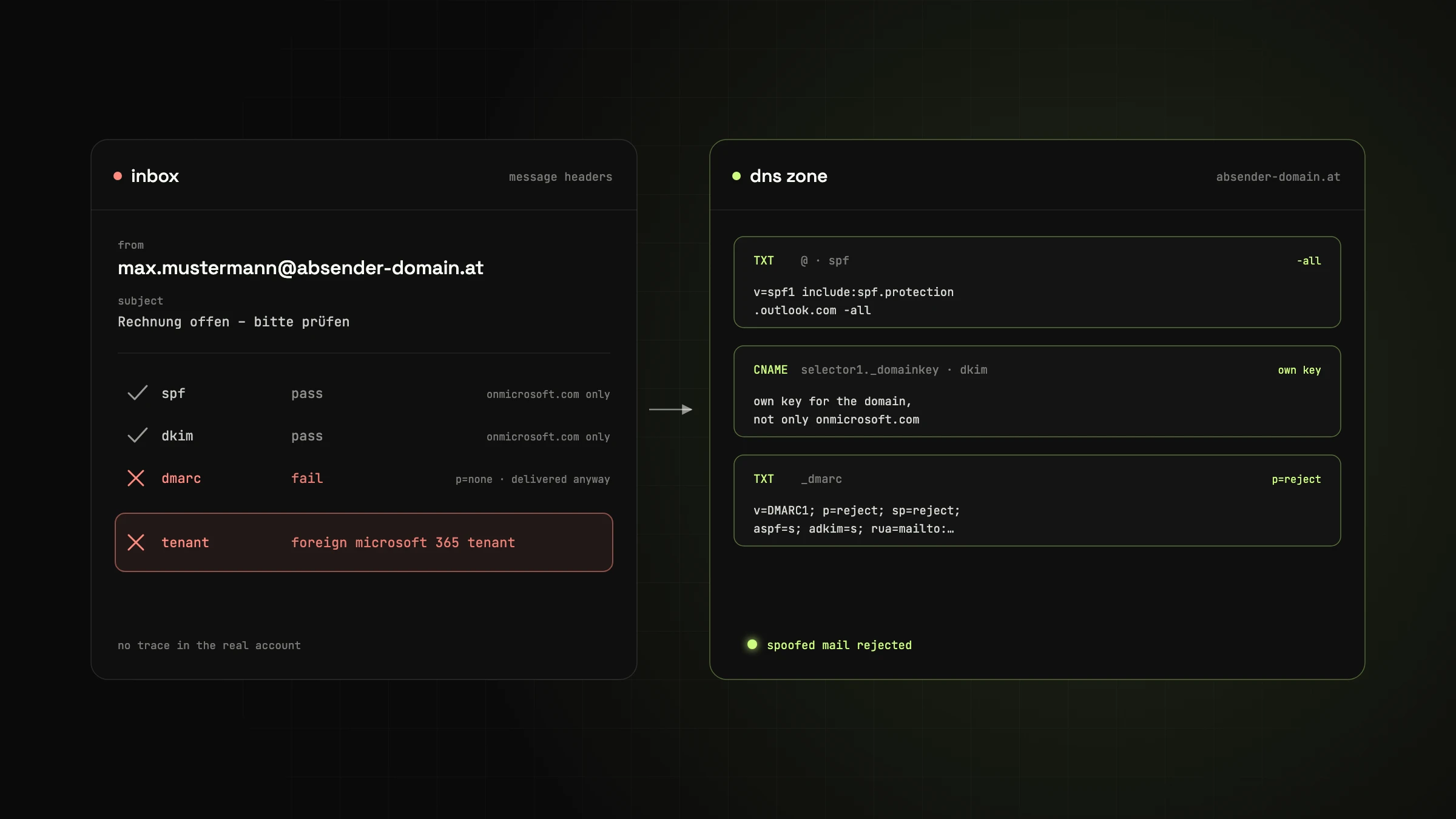
When we checked the full email headers, we found:
-
The email was actually sent via Microsoft 365. SPF and DKIM were valid, but only for a Microsoft domain (
onmicrosoft.com), not forabsender-domain.at. -
So the email failed the DMARC check, and it was delivered anyway.
-
The sender looked legitimate (
max.mustermann@absender-domain.at). -
However, there was no trace of it in the real account – the email did not come from the company's own tenant.
Someone used a different Microsoft 365 tenant to abuse the domain absender-domain.at. This was possible because the domain's DNS protections were not configured strictly enough.
Why this is dangerous
If a domain's DNS zone lacks any of these protections, third parties can send emails in the name of your domain – even through legitimate services like Microsoft 365 or Google Workspace.
In the case of max.mustermann@absender-domain.at, this was possible because:
-
SPF was correct, but not enough on its own.
-
DKIM was only active for the Microsoft subdomain, not for the company's own domain.
-
DMARC was only in “monitoring mode” (
p=none): emails that fail the check are delivered anyway.
The solution: Configure SPF, DKIM and DMARC properly
To protect against spoofing, phishing and identity theft, you need these three DNS records:
SPF (Sender Policy Framework)
Defines which mail servers are allowed to send on behalf of your domain.
v=spf1 include:spf.protection.outlook.com -allDKIM (DomainKeys Identified Mail)
Adds a digital signature to each outgoing email that the recipient can verify. Important: activate a DKIM key for your own domain, not just the provider's (e.g. Microsoft's).
DMARC (Domain-based Message Authentication, Reporting, and Conformance)
Tells recipients what to do if SPF or DKIM fails:
-
p=none→ just monitor -
p=quarantine→ mark as spam -
p=reject→ reject (recommended)
v=DMARC1; p=reject; rua=mailto:dmarc@ihredomain.at; sp=reject; aspf=s; adkim=s;Pro Tip: DMARC Monitoring Made Easy with Postmark
If you don't want to build your own infrastructure for analysing DMARC reports, you can use a service such as Postmark (https://dmarc.postmarkapp.com/). Postmark receives your daily DMARC reports automatically and presents them in a clear, visual format, including SPF/DKIM results and IP analysis.
Conclusion: Protect your domain – not just your mailbox
Many companies believe that MFA and strong passwords secure everything. But protection starts one level deeper – with your domain configuration. Only correctly configured SPF, DKIM and DMARC records ensure that nothing but authorised systems can send email on behalf of your company.
The good news: once set up correctly, these measures need very little maintenance – and besides improving security, they also improve the deliverability of your genuine emails.
Got a similar project in mind?
In a free initial call we look at your situation and tell you what's realistic and what the next step looks like.

// about the author
Alexander J. Gassner, MSc
Founder and managing director of agsolutions, with more than 15 years in software development (MSc Software Engineering, FH Hagenberg). Builds and runs business-critical software from requirements to operations: Kotlin, Spring Boot and React in the code, Kubernetes, Pulumi and GitOps in operations, as an Exoscale Certified Solution Architect.