Legacy modernisation: Why you should future-proof your industry software
Old industry software often does its job well but is expensive to run and hard to secure. Strategies from lift & shift to a rebuild, and where to start.
What is Legacy Modernisation?
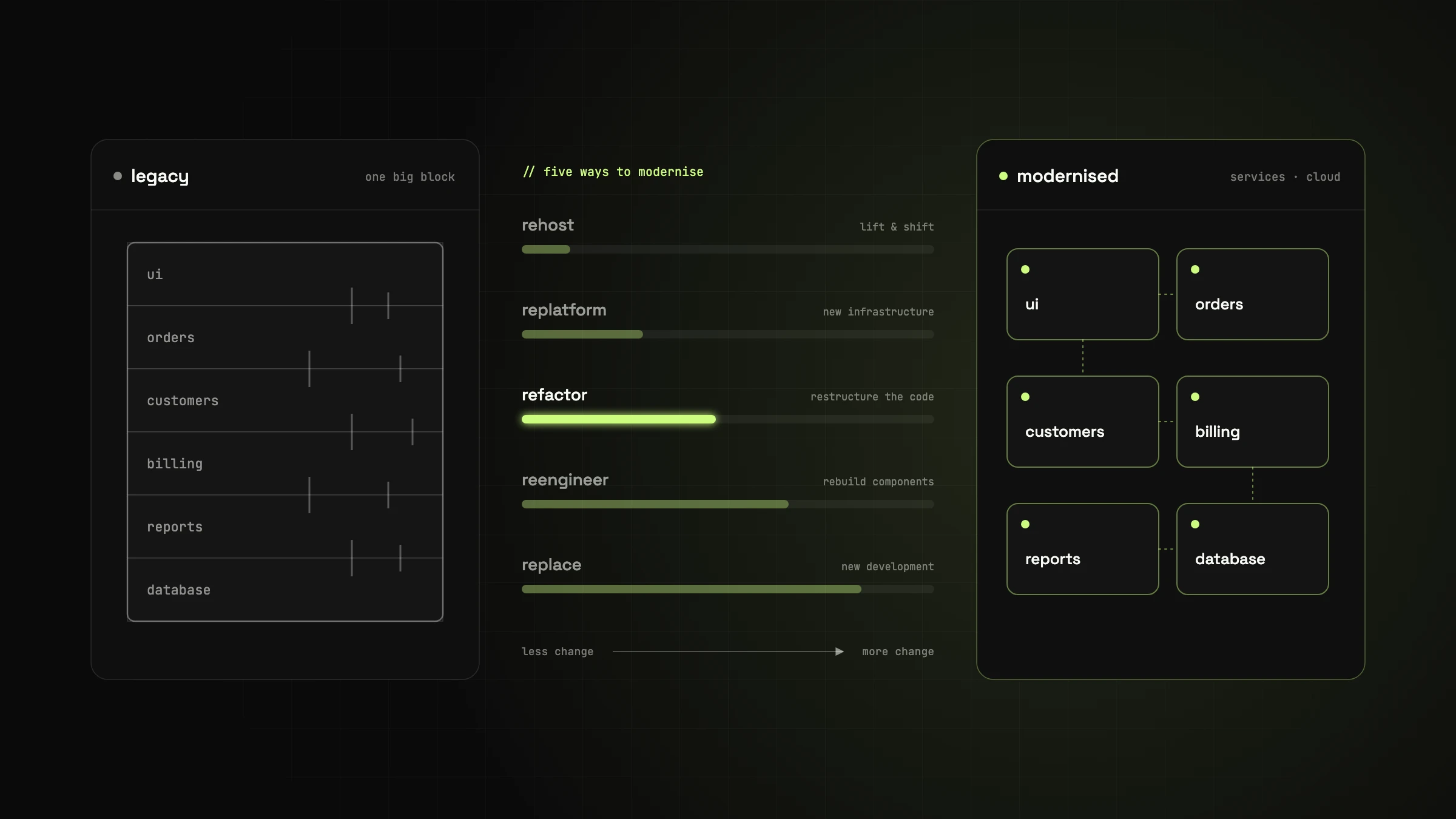
Legacy modernisation means renewing the technology behind existing software, usually industry-specific software that has evolved over many years. It ranges from moving to the cloud and cleaning up the code to a complete rebuild.
Many of these systems are functionally mature and have done their job for decades. The problem is the technology underneath: it is hard to extend, can barely be secured any more and is difficult to connect to newer applications.
Why is Legacy Modernisation Necessary?
- Outdated technology: programming languages or frameworks are no longer maintained, and every change gets more expensive.
- Security gaps: without updates, known vulnerabilities stay open.
- High operating costs: old servers, special licences and manual processes often cost more than modernising would.
- Little room for change: new requirements take a lot of effort to implement.
- Lost know-how: developers who know the old technology are getting harder to find, and often everything depends on a single person.
What Are the Benefits of Modernisation?
1. Improved Performance and Scalability
Modern architectures and cloud infrastructure handle load peaks, and new features ship faster.
2. Lower Costs and Better Maintainability
Standard technologies, automated tests and up-to-date documentation make every change less work. New developers get up to speed faster.
3. Increased Security and Compliance
Current libraries receive security updates, and requirements from the GDPR, NIS2 or the Cyber Resilience Act can only be met properly on a maintained foundation.
4. Connecting to New Technologies
On a modern foundation, you can add automation or AI features without touching the whole system.
5. Easier Integration
Clean interfaces (APIs) connect the software to other systems and cloud services.
6. Enhanced User Experience
A modern interface with short loading times saves time every day and cuts down on training.
How Does Modernisation Work?
The right strategy depends on the state of the system; often it's a combination:
- Rehosting (lift & shift) – the software moves unchanged to modern infrastructure, usually the cloud.
- Replatforming – like rehosting, but individual components are also adapted to the new platform.
- Refactoring – the code is restructured so it is easier to maintain and extend.
- Reengineering – individual components are rebuilt.
- Replacement – the legacy software is replaced entirely by newly developed software.
A real example: for labcomplete® we replaced software that had been in use for years with a new build. Most of the work wasn't the new code but tracking down forgotten features of the old software and keeping the workflow users were used to.
Conclusion: Modernise or Wait?
Many companies hesitate for fear of costs or downtime. But waiting rarely gets cheaper: every year adds security risks and maintenance work, and knowledge of the old system is lost.
The first step is an honest assessment of where you stand: what works, what slows you down, what is becoming a risk? That's exactly what a technical audit answers.
Got a similar project in mind?
In a free initial call we look at your situation and tell you what's realistic and what the next step looks like.

// about the author
Alexander J. Gassner, MSc
Founder and managing director of agsolutions, with more than 15 years in software development (MSc Software Engineering, FH Hagenberg). Builds and runs business-critical software from requirements to operations: Kotlin, Spring Boot and React in the code, Kubernetes, Pulumi and GitOps in operations, as an Exoscale Certified Solution Architect.