Security-context-aware and buffered event dispatching for asynchronous UI updates with Vaadin
Asynchronous UI updates with Vaadin: push events buffered so the browser connection isn't flooded, with access to the Spring SecurityContext.
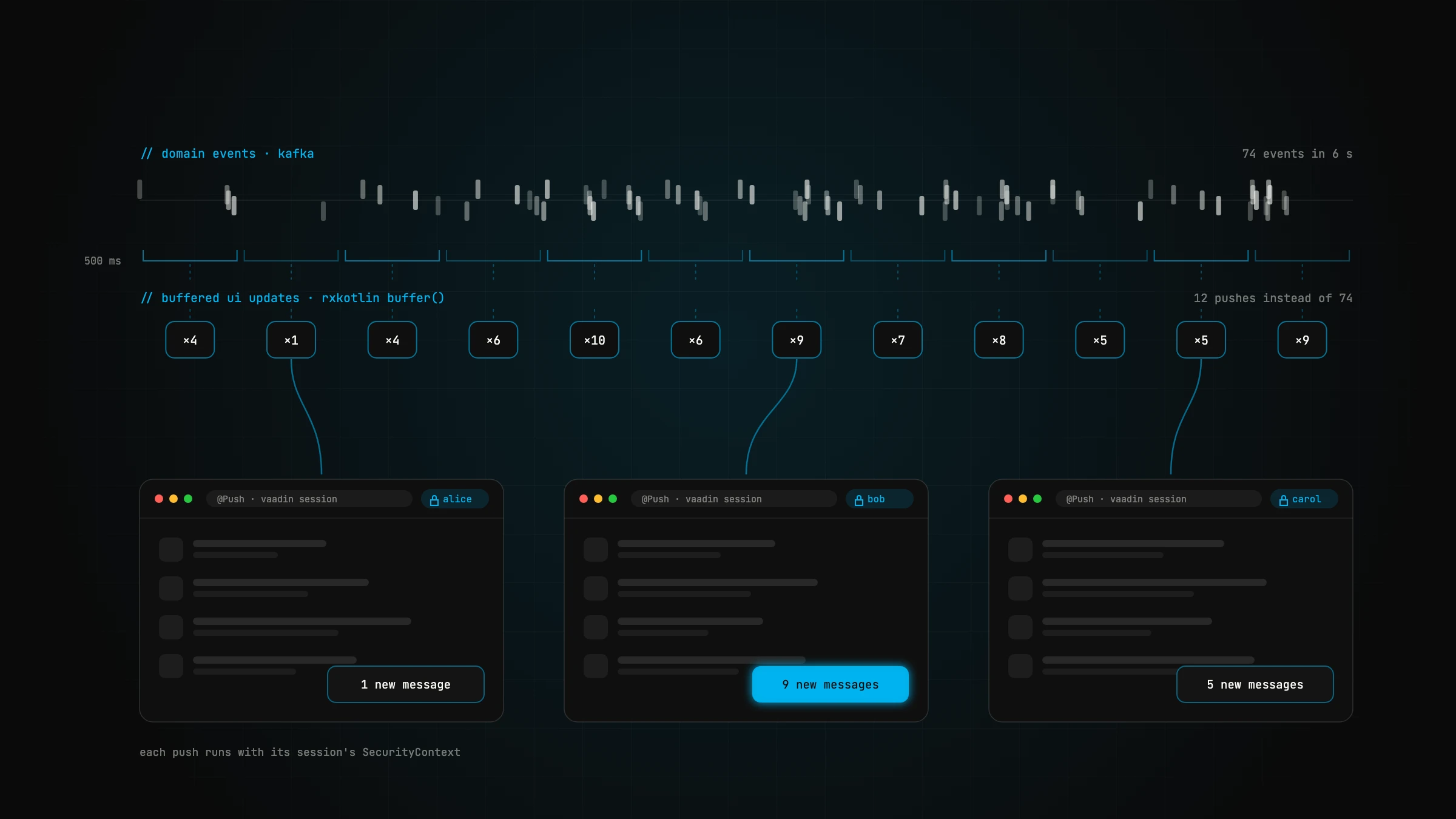
A common requirement is to push data updates from the server to the client. Think of a chat app that shows incoming messages in the browser: new messages should appear automatically, without polling and without the user having to do anything to fetch them. Vaadin UI push updates are generally straightforward to implement, but there are a few special cases to deal with.
In this article I show a way to implement asynchronous UI updates with Vaadin without flooding the client with data or overloading the server-to-client connection when many push requests arrive at the same time. And if you use Spring Security with Vaadin, you probably also need access to the user's security context to authorise push updates before they are dispatched to the browser.
First, some background on one of the larger projects my colleagues and I are working on. It is a good production example of server-to-client push. We use Apache Kafka as the central event streaming platform, and the entire state is stored in Kafka as domain events. On top of that there are a few self-contained systems (SCS) built with Vaadin and Spring Boot. When a stream listener of an SCS consumes a domain event, for example, users are notified of the change immediately via server push.
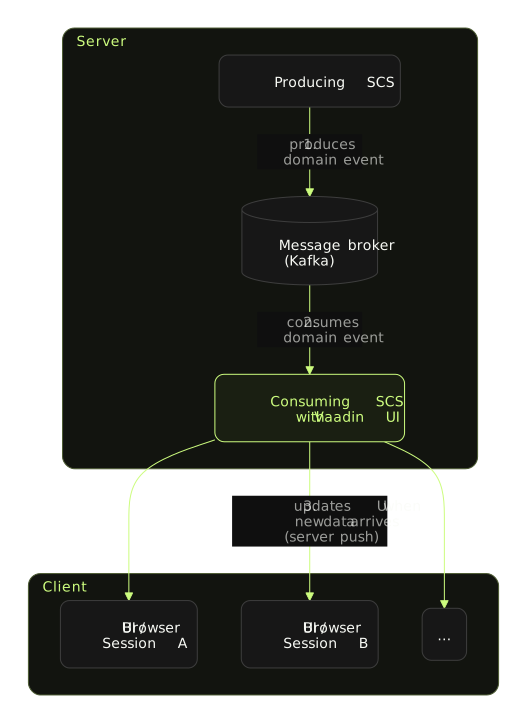
Now to the important part. Imagine each inbound event triggered an asynchronous UI update. What happens if many events are consumed at the same time, say more than 1,000? In the best case, this causes unnecessarily high load on the server and the browser; in the worst case, the app crashes. In event-driven architectures, large numbers of messages and events are the norm.
As far as I know, there is no ready-made solution to this problem for Vaadin 14+. Conventional event buses such as Guava's won't help here, because they offer neither buffering nor security context awareness out of the box.
Buffering
Buffering: periodically gather items emitted by an Observable into bundles and emit these bundles rather than emitting the items one at a time
To avoid triggering a UI update for every inbound domain event, you can use buffering. For this we introduced a simple class called UiAwareBufferingEventDispatcher. The event dispatcher collects all incoming events within a defined time span. It then emits just one event containing a list of all collected events to the consuming Vaadin components:
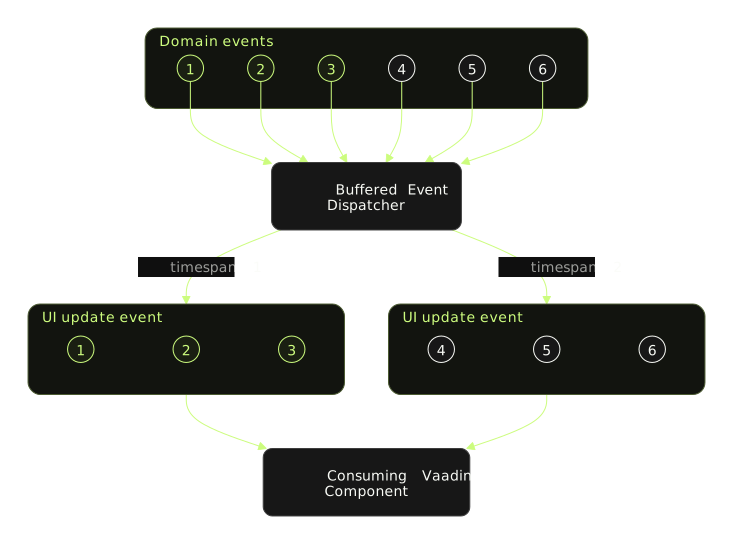
The consuming component decides how to handle the buffered events. For example, if the component only shows a simple notification such as "New data available", the last buffered event in the list is usually enough. Whether none, one, several or all events matter to a component or view depends on the use case.
Under the hood we use RxKotlin, a library for reactive programming, for the buffering:
class UiAwareBufferingEventDispatcher(/* omitted code */) {
    // omitted code...

    companion object {
        private const val BUFFER_TIMESPAN_IN_MILLIS: Long = 500L
    }

    private val subject = PublishSubject.create<Any>()
    private val scheduler = Schedulers.from(Executors.newSingleThreadExecutor())
    private var subscriber: Disposable? = null

    @PostConstruct
    fun postConstruct() {
        subscribe()
    }

    /** dispatch event (Note: runs in caller thread) */
    fun dispatch(event: Any) {
        subject.onNext(event)
    }

    /** start internal subscription to subject (events, which will be dispatched) */
    private fun subscribe() {
        if (subscriber == null || subscriber!!.isDisposed) {
            subscriber = subject.observeOn(scheduler)
                .buffer(BUFFER_TIMESPAN_IN_MILLIS, TimeUnit.MILLISECONDS)
                .subscribe {
                    // dispatches the buffered events to Vaadin components
                    this.dispatchToHandlers(it)
                }
        }
    }

    // omitted code...
}
I've published a demo project with the full code on GitHub:
Spring's SecurityContext awareness
The following snippet shows an example of a consuming view or component. When an event arrives, the session's SecurityContext is available in the async handler.
@Push
@Route("")
class MainView(
    private val dispatcher: UiAwareBufferingEventDispatcher
) : VerticalLayout() {
    // omitted code...

    override fun onAttach(event: AttachEvent) {
        dispatcher.register(this, MessagePostedEvent::class) { bufferedEvents ->
            // following code doesn't run in component's thread,
            // but the SecurityContext is available!
            val username = SecurityUtils.user?.username ?: "unknown"
            val lastEvent = bufferedEvents.last()
            add(Span("ID: ${lastEvent.id}, Username: $username"))
        }
    }

    override fun onDetach(event: DetachEvent) {
        // do not forget to unregister the consumer!
        dispatcher.unregister(this)
    }

    // omitted code...
}
The event dispatcher accesses the component's underlying HTTP session and sets the thread-bound SecurityContext before the handler is executed:
@Service
class UiAwareBufferingEventDispatcher(
    @Qualifier("uiTaskExecutor") val taskExecutor: AsyncTaskExecutor
) {
    // omitted code...

    /**
     * Sends a list of buffered events to registered handlers and synchronizes call to
     * view state with session bound security context. Runs within TaskExecutor Thread.
     * In case the view isn't bound to a UI or session this call ends
     * without any exception. (handlers should only update UI and must not trigger any
     * business logic)
     */
    private fun dispatchWithinUIContext(
        view: Component, handler: (List<*>) -> Unit,
        events: List<*>
    ) {
        val ui = view.ui.orElse(null) ?: return
        val vaadinSession = ui.session ?: return
        val httpSession = vaadinSession.session ?: return

        val sessionSecurityContext = httpSession.getAttribute(
            HttpSessionSecurityContextRepository.SPRING_SECURITY_CONTEXT_KEY
        )
        val securityContextToUse = if (sessionSecurityContext is SecurityContext) {
            sessionSecurityContext
        } else {
            SecurityContextHolder.createEmptyContext()
        }

        ui.access {
            val origCtx = SecurityContextHolder.getContext()
            try {
                SecurityContextHolder.setContext(securityContextToUse)
                handler(events)
            } catch (e: UIDetachedException) {
                // ignore exceptions (just UI updates)
            } catch (e: Exception) {
                logger().error(
                    "unexpected exception while handling events {} bound to view {}",
                    events,
                    view,
                    e
                )
            } finally {
                SecurityContextHolder.setContext(origCtx)
            }
        }
    }

    // omitted code...
}
The code is MIT-licensed and free to use in your own projects.
Got a similar project in mind?
In a free initial call we look at your situation and tell you what's realistic and what the next step looks like.

// about the author
Alexander J. Gassner, MSc
Founder and managing director of agsolutions, with more than 15 years in software development (MSc Software Engineering, FH Hagenberg). Builds and runs business-critical software from requirements to operations: Kotlin, Spring Boot and React in the code, Kubernetes, Pulumi and GitOps in operations, as an Exoscale Certified Solution Architect.