Remote Development, real infrastructure – How Tailscale enabled us to test in the GIN network
Digital Business
Modern software development often stands between two worlds: On one hand, we develop applications remotely, flexibly, and agile – on the other hand, we have to interact with local, regulated infrastructure that is exactly the opposite.
We found ourselves in this tension recently during a client project for Medcom GmbH. The company operates laboratory request software for which we realized an interface to the Austrian e-card infrastructure. Technically, this means: We need to query patient and insurance data from the software through the Health Information Network (GIN) – a completely isolated network with its own hardware, IP range, and strict access rules.
The setup was classically local:
LAN subnet
192.168.100.0/24A GIN router with IP
192.168.100.210A GINO card reader with IP
192.168.100.10All physically installed at Medcom's location
And very importantly: Every location of a contractual partner – whether a doctor's practice, laboratory, or software manufacturer – requires physically present, certified hardware for a direct connection to the GIN network.
For the application itself, integrating the e-card interface was not sorcery – there are OpenAPI and SOAP standards for that. The real challenge started with testing. How do our developers test the integration when they are not on site – and cannot directly access the e-card infrastructure?
No VPN? No problem.
A classic VPN? That would be obvious, but impractical: We do not have access to the Medcom network hardware to set up port forwarding – changes would require effort from an external IT service provider. A simple solution had to be found, without interfering with the infrastructure.
Our solution: Tailscale.
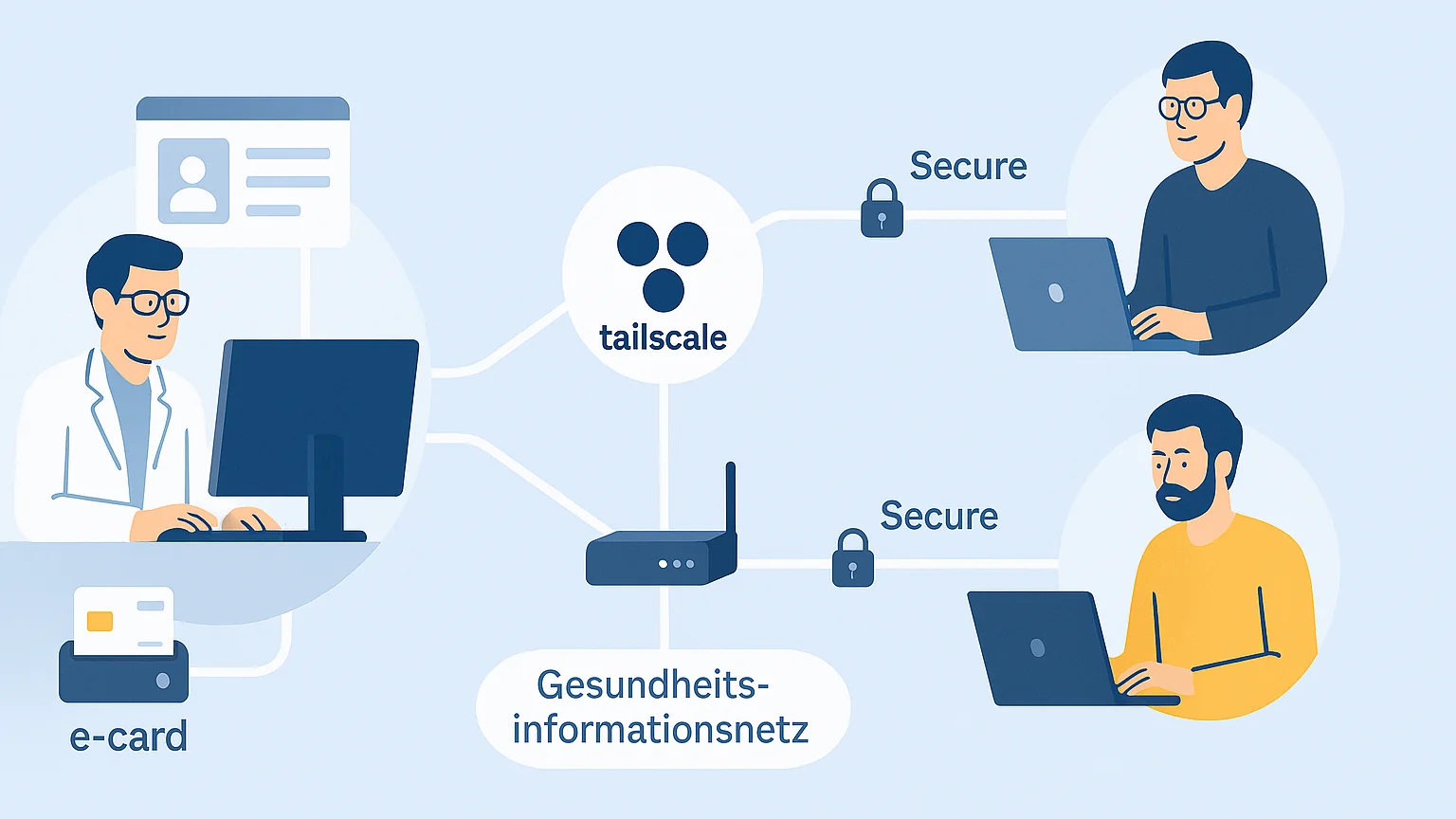
Tailscale uses the WireGuard protocol to create a secure, lightweight peer-to-peer VPN between devices. No complicated setup, no port forwarding, no fiddling with certificates. We were able to connect two systems in completely different networks – over the internet, but as if they were in the same LAN. Tailscale is more than just "another VPN". It is a modern, secure mesh network:
Zero config VPN – no port forwarding, no static IPs, no NAT problems
End-to-end encrypted via WireGuard
SSO integration – login via Google, Microsoft, GitHub, etc.
Automatic peer-to-peer connections - for better performance with less latency and more throughput
ACLs, tags, and access control directly via the admin panel
No central VPN server required – every client can be a relay or exit node
GitOps & Automation with Pulumi, Terraform, GitHub Actions, Bitbucket, etc.
Tailscale SSH - automated access control for SSH connections in the Tailnet
Kubernetes Operator - Tailscale can also be run in Kubernetes to manage access to private services
Specifically:
On a Windows computer in the Medcom network, we installed a Tailscale client.
This was set up as the relay node for the network (
192.168.100.0/24).The target route (
84.38.112.0/24- e-card test instance) was routed via GIN router192.168.100.210.Our developers could access the test instance of the e-card interface easily from home – securely, performantly, and understandably.
Complex networks, simple solutions
Especially in the medical environment, modern development practices often clash with rigid infrastructures. Instead of turning processes upside down, we rely on tools that integrate elegantly into existing structures – like Tailscale. This allows our developers to work efficiently without the customer having to painstakingly remodel their environment.
Think pragmatically, solve smartly – that is our approach at agsolutions.
🔧 Set up Tailscale in 5 steps – It's that simple
Goal: A developer should be able to access an internal network remotely (e.g., from home office).
🧩 What is needed
A computer in the target network (e.g., Windows, Linux, macOS).
One or more clients, e.g., the developers' laptops.
Administrator access to the devices.
A free Tailscale account.
✅ Step 1: Install Tailscale on both sides
In the target network (relay node)
Install Tailscale client:
⚠️
--advertise-routesallows IPs or entire IP ranges to be reachable in the Tailnet without having to install a Tailscale client on every host (e.g., on the GIN router192.168.100.210).
On the developer laptop
Tailscale is also installed, the user logs in, and the service is started:
Or simply via GUI on macOS/Windows.
✅ Step 2: Share devices in the Tailscale admin panel
https://login.tailscale.com/admin
Under Machines → [Relay device], activate the button “Enable exit node / subnet routing”
Explicitly approve route
192.168.100.0/24
✅ Step 3: Test the connection
Now a connection to the internal IP 192.168.100.210 or 84.38.112.X can be tested – e.g., by ping or direct access in the browser to the test instance of the e-card test interface.
🎉 Done!
Tailscale is now active, subnet routing works, and the team can work as if they were directly on-site. No VPN gateways, no fiddling with OpenVPN or certificates – and it all takes less than 15 minutes.