In an increasingly digitalized business world, automation is a central lever for enhancing productivity and efficiency. Particularly repetitive tasks, such as answering frequently recurring emails, can be significantly optimized through intelligent workflows. In this article, I will explain how I implemented AI-supported email automation with n8n, which makes my workday easier and saves valuable time.
Why n8n as an Automation Platform?
n8n is a powerful no-code/low-code platform that allows for the creation of flexible and customizable workflows. Moreover, n8n offers an extensive library of pre-built connectors to numerous products and services. In combination with artificial intelligence, complex processes that previously required manual interventions can be efficiently automated.
I installed n8n on a Synology NAS with Docker. Compared to the cloud variant, this option provides more control over data, reduced ongoing costs, and greater adaptability to individual business requirements. Self-hosting also allows the use of so-called community nodes and the option to use npm packages for custom-written JavaScript code.
The Process of the Email Workflow
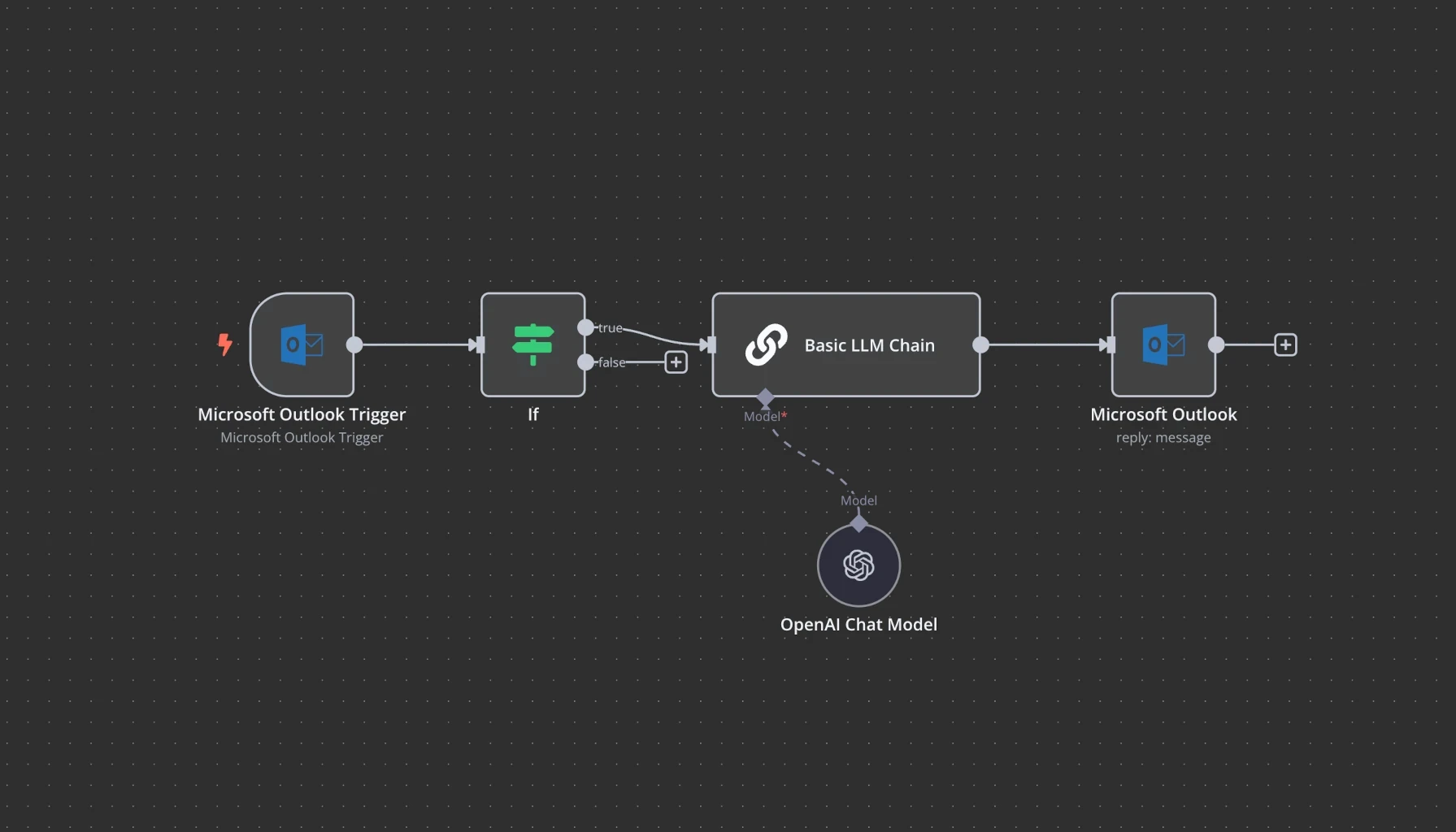
1. Automated Retrieval and Processing of Incoming Emails
Connection with Microsoft 365 Outlook via pre-built n8n connector
Filtering by defined criteria to identify relevant messages
Extraction and structuring of content for further analysis
2. Semantic Analysis by Artificial Intelligence
AI-supported text analysis to determine the context of the email
Use of a vector store or embeddings (RAG) to efficiently store and retrieve relevant information
Topic-specific prioritization and classification of incoming emails
3. Automated Generation of Response Suggestions
Creation of tailored responses using OpenAI GPT-4o
Consideration of contextual information and previous correspondences
Saving the response as a draft in Outlook so that I only need to review and send it
This workflow significantly reduces my manual processing effort, enhances response quality, and ensures consistent communication.
A crucial factor for the quality of the generated responses is the formulation of the prompts. The more precise and detailed the prompt is, the better the AI can capture the desired context and deliver high-quality results. A clear structuring of the input, relevant additional information, and concise instructions help ensure that the generated content meets the desired output.
Cloud vs. Local AI Models
During development, I tested various AI models regarding their performance:
OpenAI GPT-4o: Provides excellent results in terms of context understanding and text generation, but requires a cloud connection.
Ollama with deepseek-r1:14b: Works locally on my MacBook Pro M1, but delivers suboptimal response quality and computation speed.
Ollama with deepseek-r1:671b: Promising alternative with high potential, but has massive hardware requirements (I estimate at least 480GB VRAM, >10 high-end Nvidia GPUs), making productive use difficult.
After thorough evaluation, I chose OpenAI GPT-4o as it offers the best combination of performance, convenience, and efficiency. If the hardware side advances or becomes more affordable, I will consider whether powerful local models might be a viable alternative in the future.
Further Application Possibilities with n8n
n8n offers virtually unlimited possibilities for automating various processes. It can be used for both traditional workflows and AI-supported automations. The integration of artificial intelligence is completely optional. Here are a few examples:
Web-Scraping for automated data collection from websites
Data Synchronization between multiple systems and APIs
Automated Reporting through the combination and analysis of different data sources
AI-supported Chatbots that automatically answer inquiries and optimize support processes
Automated Social Media Analyses to detect trends early and improve interactions
AI-supported Image Recognition to automatically categorize and analyze visual content
More ideas for potential use cases: https://n8n.io/workflows/
Outlook: AI-supported Accounting
In addition to email automation, I am working on integrating artificial intelligence into accounting to optimize financial processes and improve data-driven decisions. This also includes automated document analysis, where invoices and balance sheet evaluations are converted into vectorized embeddings to enable the search for similar content or documents.
It is particularly important that no sensitive or personal data is processed in the cloud or by AI models. All sensitive data remains stored locally and is subject to strict data protection regulations. Through this automation, manual processes are reduced, and deeper insights into financial operations are made possible without compromising data security.
Conclusion: I am thrilled!
What used to take weeks can now be accomplished with just a few clicks. n8n as a workflow engine in combination with artificial intelligence is simply brilliant. The ability to create complex automations without deep programming knowledge opens up completely new perspectives. It is especially noteworthy that n8n can be installed locally on one's own infrastructure, which is a decisive advantage for data protection. This keeps all sensitive and business-critical data under one's own control – a solution that is both powerful and secure.