The Problem: 15 Repositories, One Product
Imagine this: A B2B platform that has grown over several years. Spring Boot APIs in Kotlin, React frontends, Go services for data transfer, Rust tools for data processing. Each language, each module – a separate repository.
What initially seems manageable becomes a maintenance nightmare over time:
Dependency Hell: A shared library update means pull requests in every repository that depends on it. Each repo must be tested separately to see if the new version is compatible.
CI/CD Chaos: 15 pipelines, each slightly different in configuration. When pipeline 12 fails, you first spend half an hour looking for where it differs from pipeline 3.
Version Conflicts: "Which version of
my-shared-libis used by service X?" – a question that no one can answer without research. And if two services use different versions, you only notice it in the test environment.Onboarding Effort: New developers first need to understand which repositories are dependent on each other and how they interact. "Which repo do I need to clone for feature Y? And which other repos do I need for that?"
"Works on my machine": Developer A has Java 17, developer B has Java 21, the CI server has Java 25. All three get different results.
The obvious objection: "A monorepo? With five different programming languages? That can't work."
It works. And the build is faster than before.
Why Nx – Even for Non-JavaScript Projects?
Nx is often perceived as a tool for Angular or React monorepos. But the core of Nx is language-agnostic. Nx does not orchestrate "JavaScript builds" – Nx orchestrates tasks. A task can be mvn package, cargo build or go build. Nx does not care.
Its strength lies in three concepts that work independently of the programming language:
Task Graphs: Nx understands dependencies between projects. If service A depends on library B, library B is automatically built first. This may sound trivial, but with 15 projects in 4 languages with mutual dependencies, manual orchestration quickly becomes impossible.
Caching: If nothing has changed in a project, it is not rebuilt. Nx calculates a hash over all relevant input files. If the inputs are identical to the last build, the result is taken from the cache – in milliseconds instead of minutes.
Affected Detection: On a git push, not all 15 projects are built; only those that are actually affected by the changes. If only the frontend changes, the Spring Boot server stays idle.
In practice, this means: Regardless of whether Kotlin, TypeScript, Go, or Rust – the interface always remains the same:
No switching between mvn, pnpm, cargo, and go in the CI pipeline. One command for everything.
Unifying Toolchains with Mise
Before Nx can orchestrate, each language needs its toolchain. In the world of 15 repositories, it looked like this:
nvmfor Node.js versionsSDKMANfor Java and Mavenrustupfor Rustgoenvfor GoManually installed CLIs for
kubectl,helm,pulumi, the Exoscale CLI, and half a dozen other tools
Five different version managers, five different configuration formats, five places where something can go wrong. And something goes wrong regularly: One developer has Node 18 locally, while the CI server has Node 24. Or someone forgets to update SDKMAN and builds with an old Java version. The errors are subtle and cost hours.
Mise solves this radically: A single file at the repository root defines all tool versions.
A single mise install and the entire technology stack is up. Everything in the exact same versions, on every machine, in every CI pipeline.
That sounds like a small detail, but in practice, it eliminates an entire category of problems. "Works on my machine" no longer exists because there is no difference between "my machine" and the CI server.
More than a Version Manager: Infrastructure Access
Mise not only manages tool versions. Through environment variables and tasks, it becomes the central entry point for the entire development environment – including cloud access.
In our case, the entire infrastructure runs on Exoscale, a European cloud provider with data centers in Austria. Mise configures access to all Exoscale services:
Why AWS credentials for Exoscale? Because Exoscale offers S3-compatible Object Storage (SOS). Standard AWS tools like the AWS CLI, the AWS SDK, and Pulumi work directly – you just need to point the endpoint to Exoscale. More on this in the section about Pulumi.
The actual secrets are held in a mise.local.toml, which is not checked into Git:
For Kubernetes access, we do not use a static token or an exported certificate, but an Exec Credential Provider. The kubeconfig.yaml calls the Exoscale CLI on every kubectl command, dynamically generating a short-lived credential:
The advantage: No long-lived token that needs to be rotated. As long as the Exoscale credentials in mise.local.toml are valid, kubectl works – the exo CLI handles authentication in the background.
Mise can also define tasks – shell scripts that reside directly in the mise.toml. We use this to convert the Exoscale credentials into an AWS-compatible credentials file:
A mise run generate-aws-creds reads the Exoscale secrets from mise.local.toml and writes them in AWS credentials format. The result:
This allows aws s3 ls, Pulumi, and all S3-compatible tools to work with Exoscale.
The onboarding of a new developer now looks like this:
What previously took hours now takes minutes.
Nx as a Polyglot Orchestrator: The Configuration in Detail
That sounds elegant in theory. But what does the actual configuration look like? Nx has to understand which files belong to which project – and what distinguishes a change to a pom.xml from a change to a package.json.
The Problem with npm Lock Files
Without special configuration, the following happens: A frontend developer updates an npm package. The pnpm-lock.yaml changes. Nx then marks all projects as affected – including the Go services, Rust tools, and Spring Boot APIs, which have nothing to do with npm. The entire monorepo advantage is lost: Everything is rebuilt.
The solution is Named Inputs – language-specific definitions that tell Nx which files are relevant for which project category:
The crucial difference: In JVM, Go, and Rust, "externalDependencies": [] is listed – an empty list. This tells Nx: "This project has no npm dependencies. Changes to pnpm-lock.yaml are irrelevant." Only for TypeScript projects is this entry missing, because changes in npm packages do actually affect the build.
Additionally, a plugin configuration that instructs Nx to analyze the pnpm workspace structure:
The auto setting ensures that Nx parses the pnpm-workspace.yaml and only marks projects as affected that are actually registered in the pnpm workspace. Go, Rust, and JVM projects are not listed there – so they are not affected by npm changes.
Project Configuration: Same Structure, Different Language
Nx automatically recognizes JavaScript projects via their package.json. For non-JavaScript projects, a project.json is created in the project directory – a simple JSON file that tells Nx: "Here is a project, and this is how it is built." That is the entire effort required to integrate a Maven or Cargo project into Nx.
The structure is always the same – only the commands and inputs differ according to the language. Two placeholders appear repeatedly: {projectRoot} points to the directory of the current project (e.g., jvm/backend-api/), {workspaceRoot} points to the monorepo root.
A Spring Boot API project:
A Rust project:
The semantics are identical everywhere: inputs defines which files invalidate the cache. outputs defines which directories are cached. dependsOn defines what must run before. It does not matter whether mvn, cargo, go, or pnpm is executed behind it.
Docker packaging is also an Nx target. It depends on build and is only executed in the CI pipeline on master and release branches:
Two tags per image: master (which will be overwritten) and master-1fa4666 (immutable). This is important for the deployment strategy – more on this shortly.
Shared Libraries Across Language Boundaries
A monorepo fully realizes its value when code and definitions are shared across projects. In our setup, there are two patterns that make this advantage concrete.
Pattern 1: Shared Library Within a Language
Multiple Spring Boot services share a library. Without a monorepo, this meant: A separate library in its own repository, with its own version cycle, its own CI pipeline, and manual updates in each consumer repo.
In the monorepo, the shared library simply resides next to the services:
The consumer services bind the library as a normal Maven dependency. The version permanently stays at 0.0.0-SNAPSHOT – there is no release cycle for the library, as it is never released separately. In the monorepo, the current state is always built:
Deliberately No Maven Reactor
A tempting approach would be to pack all JVM projects into a Maven multi-module project (Reactor) – with an parent pom.xml that knows all modules. We deliberately chose against this.
The reason: In a polyglot monorepo, Maven is only one of five build toolchains. A reactor would squeeze the JVM projects into their own dependency structure, parallel to the graph that Nx already manages. The result would be two overlapping systems – Maven reactor for JVM-internal dependencies, Nx for everything else. This would quickly become confusing.
Instead, all JVM projects are standalone Maven projects without a common parent POM. The dependencies between them are managed solely by Nx:
In the CI pipeline, Nx ensures that mvn install runs on the library before the dependent services are built. Locally, this is often not necessary: IDEs like IntelliJ are smart enough to recognize the Maven projects in the monorepo and resolve the dependencies directly – without the library being installed into the local Maven repository first. You open the monorepo in IntelliJ, and the source navigation between library and consumer works immediately.
The effect: If a developer changes something in the shared library, all dependent services are automatically rebuilt and tested in CI. In one commit. No manual version bumps, no forgotten repositories. And locally, you still have full IDE support with direct navigation and refactoring across module boundaries.
Pattern 2: Cross-Language Code Generation via API Specs
This is where it gets really exciting – and where the biggest advantage over separate repositories shows.
The scenario: The Spring Boot API defines an OpenAPI spec (api.yaml) and a GraphQL schema (schema.graphqls). A Go service generates its HTTP client from the OpenAPI spec. The React frontend generates its TypeScript types from the GraphQL schema.
In the world of 15 repositories, the process was: API developer changes the spec, commits, pushes. Then he writes a message in the team chat: "Hey, I changed the API, please regenerate your clients." Maybe someone does it. Maybe someone forgets. Maybe it’s only noticed when the test environment fails.
In the monorepo, this happens automatically. The spec files live in the backend project:
The Go service declares the OpenAPI spec as an input to its code generation:
The frontend declares the GraphQL schema as an input:
What happens now if a developer alters the api.yaml?
Nx detects through the inputs configuration that a file has changed that is referenced by multiple projects. The resulting cascade:
backend-api:buildis triggered – the API itself is rebuilt and tested with the modified spec.go-service:codegenis triggered –go generategenerates a new HTTP client from the updated spec.go-service:buildfollows automatically (becausedependsOn: ["codegen"]) – the Go service is compiled with the new client. If the new client does not match the existing code, the build fails here.frontend:codegenis triggered – the TypeScript types are generated from the updated schema.frontend:buildfollows automatically – the frontend is compiled with the new types. TypeScript errors become immediately visible.
All in one git push. No manual "Please regenerate the clients" in a Slack channel. No forgotten repository that still uses the old spec version. If the build is green, all clients are synchronized. If it is red, you know immediately where the incompatibility lies.
That is the difference a monorepo makes: The API spec is the Single Source of Truth, and the build system ensures that no consumer can decouple from it.
Affected Detection: Only Build What Changes
The greatest performance gain comes from affected detection. The principle is simple: Instead of building and testing all 15 projects with each git push, the pipeline accurately determines which projects are affected by the changes in the current commit.
On a typical workday, perhaps two or three projects change. Without affected detection, the pipeline still builds all 15 – including the Rust tools and Go services that haven’t been touched in weeks. This wastes time and CI resources.
The logic in the pipeline:
What does nx show projects --affected do? Nx compares the current state with the base commit and determines which files have changed. It then checks the inputs configuration of each project to see if the changed files are relevant. It also considers the dependency graph: If the shared library changes, all services depending on it are automatically affected.
The marker-file pattern (touch affected/{project}) creates a file per affected project in the filesystem. This has proven to be effective in practice, as these markers can be read in later pipeline steps – for example, to decide which Docker images need to be built and pushed.
The Difference in Numbers in the CI Pipeline
Scenario | 15 Repos (before) | Monorepo (after) |
|---|---|---|
Change in a single project | ~5 min (single build) | ~5 min (only this project) |
Change in Shared Library | ~40 min (manually update dependent repos) | ~10 min (automatically, in parallel) |
Dependency Update (npm) | ~60 min (all Node repos) | ~10 min (only affected TS projects) |
Nx Cache Hit | not possible | ~30 sec (nothing is built) |
The monorepo build is faster in most scenarios because it builds less – even though it contains more projects.
Caching Strategy
Affected detection determines which projects are built. Caching determines whether they actually need to be built.
Nx computes a hash over all inputs for each target: source files, configuration files, dependencies. If the hash is identical to the last successful build, the cached result is used – the build command is not executed at all.
In the CI pipeline, along with the Nx cache, language-specific caches are configured to avoid re-downloading all Maven artifacts or npm packages with each run:
Not everything is cached. Docker builds are deliberately excluded because a cached Docker image can lead to deploying an outdated version. Likewise for serve (dev server) and clean – targets where caching makes no sense.
Remote Cache: Share Build Results
Locally and in the CI pipeline, the Nx cache already saves a lot of time. But the full leverage comes with a remote cache: Build results are centrally stored and shared across all developers and CI runs.
The principle: Developer A builds backend-api locally. The result is stored in the remote cache. If Developer B – or the CI pipeline – builds the same project with the same inputs, the result is fetched directly from the cache. With 15 projects averaging several minutes of build time per project, this is an enormous time gain.
Nx offers Self-Hosted Remote Caching with an S3-compatible storage backend. And since Exoscale SOS is S3-compatible, it all comes together: The remote cache can reside in the same Exoscale account as the rest of the infrastructure – no external caching service, no data leaving the company.
Infrastructure as Code with Pulumi on Exoscale
Until now, we focused on code, builds, and tests. But a product must run somewhere. In our case, the entire infrastructure runs on Exoscale – defined as Infrastructure as Code with Pulumi.
Why Exoscale?
Exoscale is a European cloud provider with data centers in Austria and across the EU. For projects with GDPR requirements or a desire for data sovereignty, this is a crucial advantage over AWS, Azure, or GCP: the data never leaves European jurisdiction.
What many find surprising: Exoscale offers a complete platform that provides all the building blocks for a modern cloud architecture. Managed Kubernetes, S3-compatible Object Storage, Managed PostgreSQL, Container Registry – everything needed for a production environment. Without the complexity of 200+ AWS services but also without the limitations of simple hosting solutions.
Why Pulumi instead of Terraform?
Pulumi defines infrastructure in real programming languages – in our case, TypeScript. This means: No new DSL to learn, IDE support with auto-complete, and the ability to use loops, conditions, and functions instead of copy-pasting.
Kubernetes: Exoscale SKS
Exoscale SKS (Scalable Kubernetes Service) is a fully managed Kubernetes cluster. In Pulumi:
In addition, anti-affinity groups can ensure that the nodes run on different physical hosts.
Object Storage: S3-Compatible, but European
Exoscale SOS (Simple Object Storage) is API-compatible with AWS S3. That’s the key: The same code, the same SDKs, the same tools – but the data stays in Vienna instead of Virginia.
In Pulumi, we use the standard AWS provider. The only difference to AWS: the endpoint.
The skip flags are necessary because Exoscale is not AWS – there is no AWS metadata service and no AWS regions. But everything regarding S3 operations (upload, download, presigned URLs, versioning) works identically.
The same approach also works locally via the AWS CLI:
Managed PostgreSQL
Automatic backups, IP filtering, termination protection – all declaratively defined in Pulumi, versioned in Git.
Pulumi State: Also on Exoscale
A frequently overlooked detail: Where does the Pulumi state – that is, the complete state of the infrastructure – reside? By default, it’s on Pulumi Cloud (based in the US) or in an AWS S3 bucket.
In our setup, the state resides in an Exoscale SOS bucket:
This makes the chain completely sovereign: The code is in Europe, the infrastructure definition is in Europe, the infrastructure state is in Europe, and the running services are in Europe. Not a single data point leaves European jurisdiction.
From Git Push to Kubernetes: The Complete Pipeline
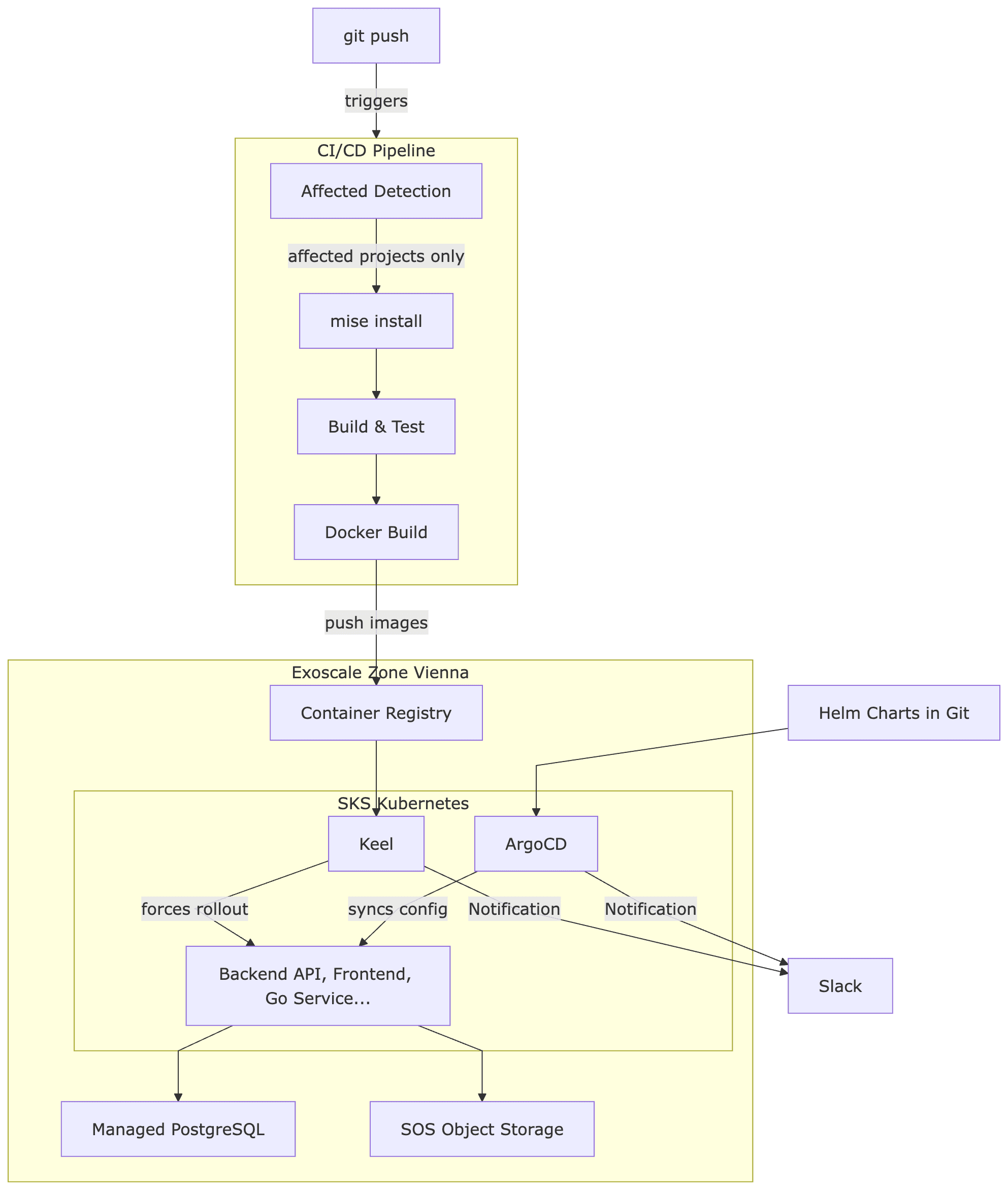
Now for the big picture. What happens when a developer pushes their code – until the application runs on the Kubernetes cluster in Vienna?
Step by Step
1. Git Push: A developer pushes to the master branch.
2. Affected Detection: The CI pipeline determines via nx show projects --affected which of the 15 projects are affected. If only frontend files have changed, not a single JVM or Go build is triggered.
3. Mise Install: All the required tools are installed via Mise. Thanks to the CI cache, it only takes seconds after the first run.
4. Build & Test: Nx runs lint, build, and test in parallel for all affected projects. Non-affected projects are skipped. Cached results are reused.
5. Docker Build & Tag: Docker images are created only for affected, containerized services. Each image gets two tags: the branch name (master) and a unique version (master-1fa4666). The branch tag is overwritten with each build, while the commit tag remains immutable.
6. Push to Exoscale Container Registry: The images are pushed to the private container registry on Exoscale. Exoscale offers its own registry – no Docker Hub, no AWS ECR needed.
7. Keel detects new images (Test/Staging): Here comes an important detail: In the test environment, the Kubernetes deployments point to a pinned tag – e.g., image: backend-api:master. ArgoCD alone would not trigger an update because the tag in the Helm charts does not change – it remains master. But the content behind the tag is new. Keel addresses this issue: It monitors the container registry, recognizes that master points to a new digest, and forces a rollout in the cluster.
8. ArgoCD for Configuration and Production: ArgoCD monitors a GitOps repository with Helm charts. Infrastructure changes – new environment variables, changed resource limits, additional services – are governed through Git commits. In production, explicit image versions are also set (e.g., image: backend-api:master-1fa4666) to ensure that deployments occur deliberately and transparently.
Two clusters – test (automatically via Keel) and production (explicit versions via ArgoCD) – ensure that every change is first validated in the test environment before being deliberately promoted to production.
The Result
After consolidating 15 repositories into a polyglot monorepo:
Build times reduced by 60-80% – not through faster hardware, but because affected detection and caching only build what has actually changed.
Onboarding reduced from hours to minutes –
git clone,mise install,pnpm install, done. No more "What Java version do I need again?"API changes cannot be forgotten – if the OpenAPI spec changes, all clients in Go and TypeScript are automatically regenerated. The build fails before incompatible code enters the test environment.
Atomic Changes Across Language Boundaries – one commit can change the API, the Go client, and the TypeScript frontend simultaneously. In 15 separate repos, these would have been three coordinated pull requests.
Completely European Sovereign – from the Pulumi state to the container registry to the database, everything runs on Exoscale in Vienna. Not a single data point leaves European jurisdiction.
Conclusion
The combination of Nx, Mise, Pulumi, and Exoscale enables a fully sovereign development and operation stack:
Nx orchestrates the build across all languages – whether Kotlin, TypeScript, Go, or Rust.
Mise unifies the entire toolchain in one file – including cloud access to Exoscale.
Pulumi defines the infrastructure as TypeScript code – traceable, versioned, reviewable.
Exoscale provides the European cloud platform – with managed Kubernetes, S3-compatible storage, PostgreSQL, and container registry.
No AWS. No Azure. No Google Cloud. Everything in Europe, everything GDPR-compliant, everything from a single source.
We help businesses implement exactly such architectures – from monorepo migration through infrastructure as code to ongoing operation on the sovereign EU cloud. Learn more →