We built an AI-powered parameter assistant for MedCom labcomplete®. The system suggests suitable parameters to doctors when ordering lab tests – based on medical context, order history, and billing rules. In this post, I describe the technical decisions, the architecture, and what we learned along the way.
Starting point
When ordering a lab test, the doctor selects from hundreds of possible parameters. Which of them make sense depends on several factors:
Age, gender, and the doctor's specialty
Insurance status (not every parameter can be billed with every insurance)
Order history over the last six months
Available sample material (for follow-up requests, only certain parameters can be run on the existing sample)
In addition, there are billing rules, LOINC codes, and parameter incompatibilities. Given the sheer number of parameters and their often cryptic abbreviations, doctors often do not even know what the lab actually offers and which parameters would be relevant to their clinical question. This knowledge has so far lived in the heads of experienced lab staff.
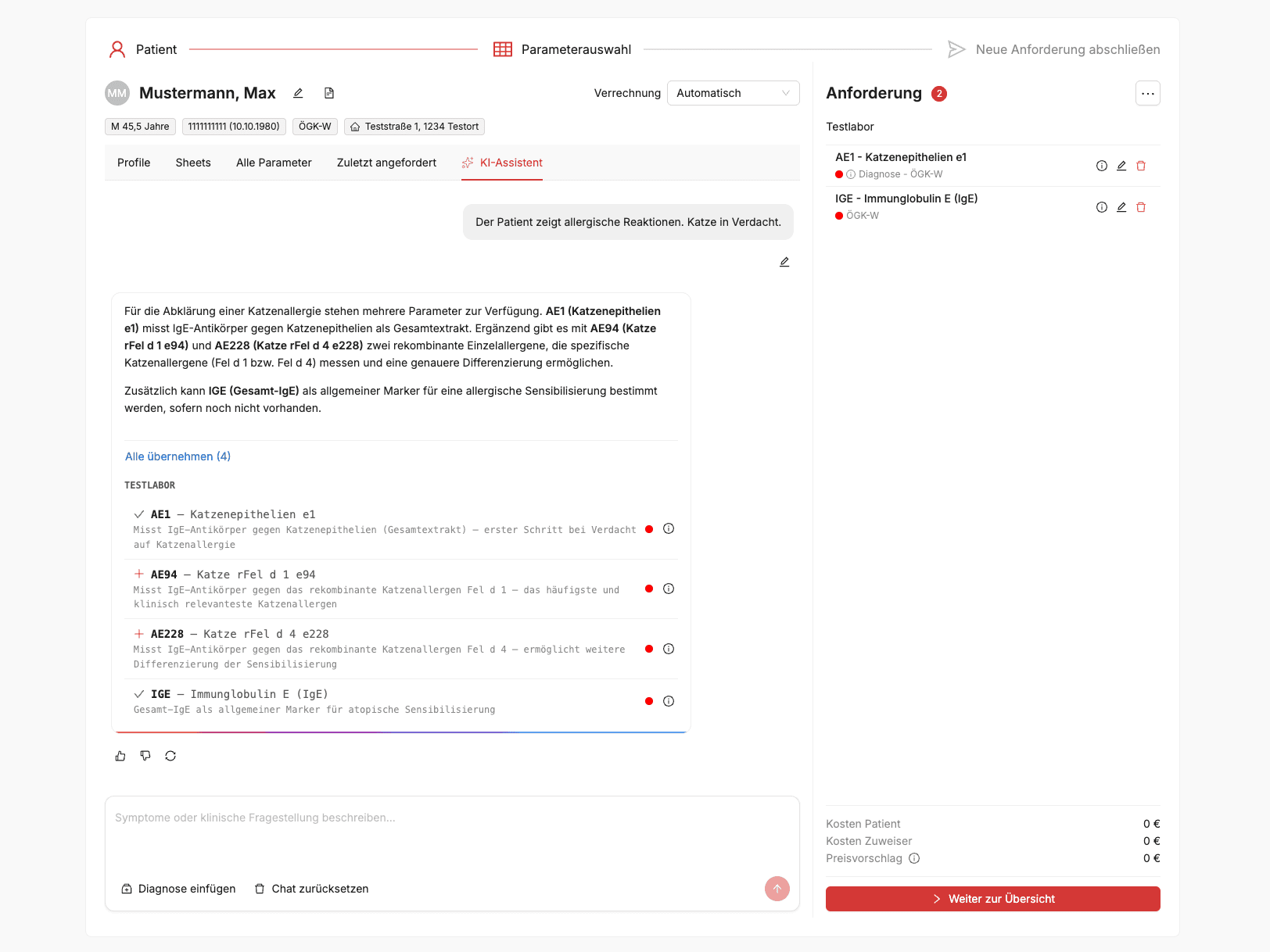
This is exactly where the assistant comes in: the doctor enters a medical question or symptoms – e.g. “Suspicion of iron deficiency and thyroid dysfunction” – and receives suitable parameter suggestions. For each suggestion, the system provides a rationale: which parameter, why it is relevant, and what it measures.
What the system does – and does not do
The assistant is integrated into the existing ordering interface and suggests parameters in real time. It knows all available lab parameters, including LOINC codes, synonyms, and billing rules, and takes the context of the current order into account.
Important: The system is not a medical device. It does not diagnose or make medical decisions. The final choice is up to the doctor. Questions outside the defined scope – e.g. “Does the patient have diabetes?” – are rejected. The model is strictly limited to parameter suggestions.
Model choice
The choice of language model was the decision with the biggest impact on the outcome.
First attempt: open-source model. Result:
Hallucinations – the model invented parameter names that did not exist, despite a hardened system prompt
Medical context was often ignored (specialty, insurance status)
Time to First Token (TTFT) sometimes over a minute
No token caching available
For a system where false suggestions can have consequences, that was not acceptable.
Second attempt: commercial model via an EU-hosted managed service. Result:
No hallucinations in parameter names
Reliable context understanding
Time to First Token in the low-second range
Reliable structured JSON output
The requirement was that the model run exclusively on EU infrastructure. Direct API calls to US endpoints were not an option.
Token prices are higher for the commercial model than for the open-source alternative – but it pays off: no hallucinations, no manual corrections, no rework. The costs are in the cents per request. Above all, token caching helps enormously here – in multi-turn chats, the system prompt and parameter context are cached, which significantly reduces costs for follow-up requests.
I deliberately do not name specific providers or models here – they change quickly, and the lessons from this project remain valid regardless. What matters is the evaluation process, not the label on the model.
Privacy
No personal data goes to the language model. No name, no social security number, no address. The model receives only anonymized context data: age, gender, insurance status. All LLM communication runs over EU infrastructure.
All patient data and critical data remain on our Exoscale infrastructure in Austria and are never sent to the AI provider. Before the LLM call, the backend extracts only the anonymized context data – everything else stays on Exoscale.
That was designed that way from the start, not retrofitted later.
Architecture
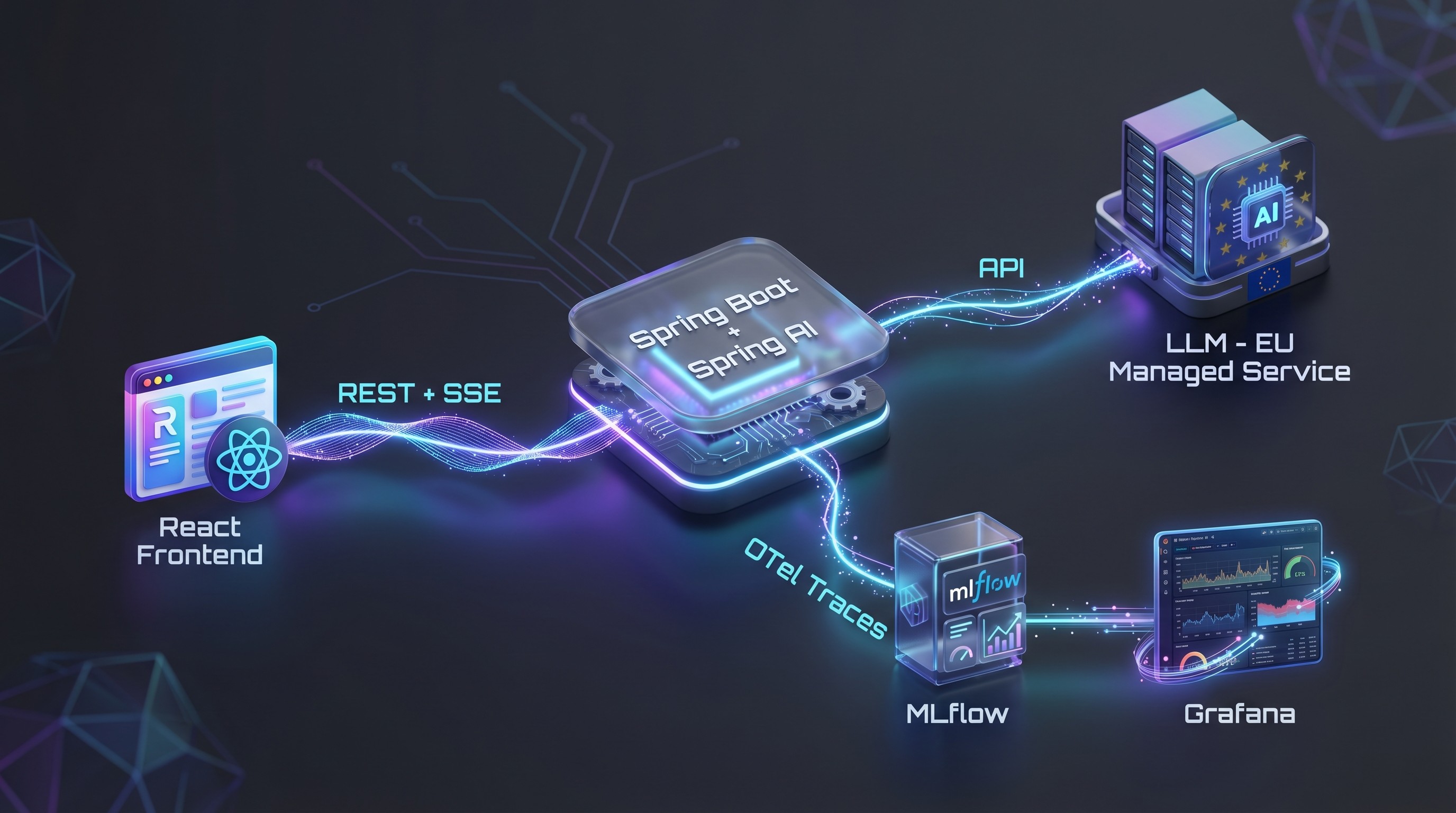
The main components:
Frontend: React with Ant Design X
Backend: Spring Boot with Spring AI for LLM integration
Streaming: Server-Sent Events – the response is streamed in real time
Rate limiting: Per user, implemented with Redis
Feedback: Thumbs up/down with optional free text, written to MLflow
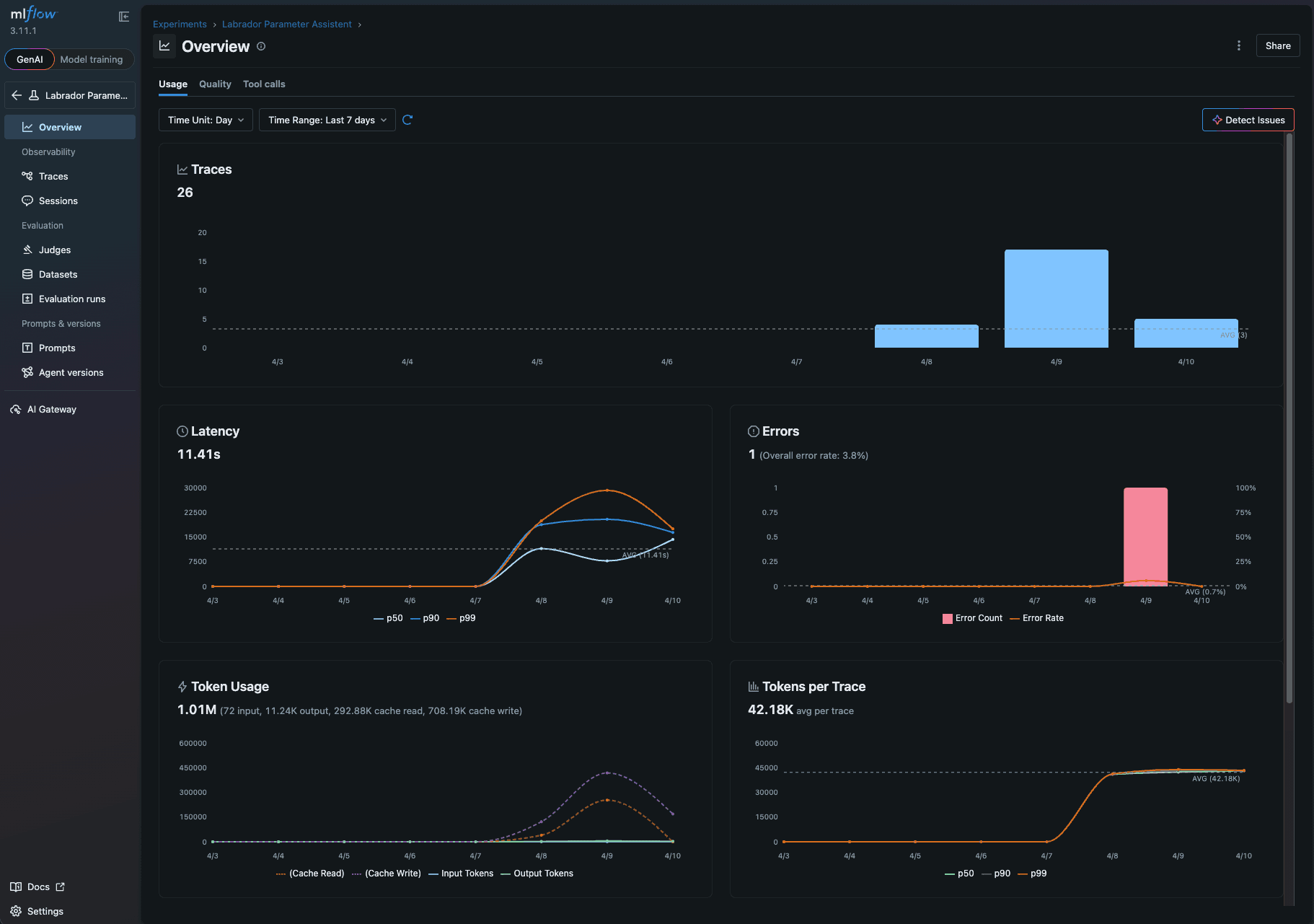
Observability: OpenTelemetry traces → MLflow + Grafana dashboard (token consumption, cost per referrer, latency, etc.)
Why MLflow instead of Langfuse?
We deliberately chose MLflow over Langfuse. The reason: infrastructure overhead. In self-hosted operation, Langfuse requires Redis, PostgreSQL, ClickHouse, and S3 – a considerable amount of work for operations and maintenance. For our use case, MLflow runs with a single PostgreSQL database. That fits our principle of introducing complexity only where it brings clear added value.
Context instead of RAG
We do not use retrieval-augmented generation. For each request, all relevant parameters including LOINC codes, synonyms, and AI descriptions are packed into the context. This works thanks to a compressed, efficient format. The context consists of three layers:
Global system prompt
Lab-specific extension of the system prompt
Parameter-specific context (description, LOINC, synonyms, short/long name)
At around 1,000 lab parameters, the context is about 50,000 tokens. That fits entirely in the context window – so RAG was not necessary. This greatly simplified the architecture.
Quality assurance with automated evaluations
We built an automated eval pipeline:
Defined test scenarios with expected results
Automated tests against the live endpoint
Scorers validate the responses for correctness and completeness
Model-as-a-Judge: A second model assesses the quality
All results are versioned in MLflow and are comparable across model versions
The system prompt was optimized over several iterations, with each change automatically tested against the eval suite.
Timeline
It took two to three weeks from prototype to production:
Week 1: Prototype with LLM integration, initial eval scenarios
Week 2: Streaming UI, feedback, rate limiting, observability
Week 3: Beta rollout to selected testers, prompt fine-tuning with real feedback
Then a gradual rollout: first beta testers, then release to additional users.
What I would do differently
Start model evaluation earlier. The detour via the open-source model cost time. Next time, I would evaluate this earlier and more broadly.
Build the feedback loop earlier. Real user feedback is extremely valuable – the sooner it flows in, the better.
Observability from the first commit. We only added token consumption per user to monitoring quite late. In a system with variable context sizes (500 to 1,000+ parameters), the cost per request is not constant – that needs to be made visible from the start, otherwise it will come back to bite you during rollout.
Conclusion
Two to three weeks from prototype to production – that sounds fast, but it was only possible thanks to careful upfront planning. The architecture decisions (no RAG, no fine-tuning, EU-only hosting, MLflow instead of Langfuse) were fixed before the first line of code was written. Without this clear picture, we would have been constantly rebuilding along the way.
The most important factors for success: the right model choice based on systematic evaluation, privacy as an architectural principle from day 1, automated evals as a safety net, and the deliberate avoidance of unnecessary complexity.